How to add a link to your TikTok bio
A clickable link in your TikTok profile is the shortest path from a video to an offer: a link in the description under a video isn’t clickable, but one in your profile is. TikTok unlocks the website field for accounts with at least 1,000 followers or after business verification. Below: how to get verified and where to paste your link from the Monetiz dashboard.
How do you know if you need business verification?
Open Profile → Edit profile → Links: if the website field is already there, you don’t need verification and can skip straight to Step 4.
TikTok unlocks a website link in your profile if one of two conditions is met:
- the account has at least 1,000 followers;
- the account is a Registered Business Account, meaning the business has passed verification.
Feature availability depends on your market and the specific account. Simply switching your profile to a business account often isn’t enough: the field appears once verification is approved.
What should you prepare in advance?
You’ll need a business document, the business’s exact name and registration number, access to a verification method, and your link from the dashboard.
- A valid business document that TikTok accepts for your country of registration. The list is in TikTok’s help article on accepted documents.
- The full legal name and registration number, exactly as written in the document.
- Access to the verification method TikTok offers at the end of the application.
- Your link from the Monetiz dashboard. In the UYAVA offer, this is the link of your chosen theme: you copy it, along with the bio text, from the “Pick a banner for your video” block.
No documents, or not sure which one will work? Message Support on Telegram: we’ll tell you what to submit for your country and go over the rejection if you’ve had one.
Step 1. Open business verification
In your profile, open the menu → Settings and privacy → Account → Business verification. Read the terms and tap Get started.
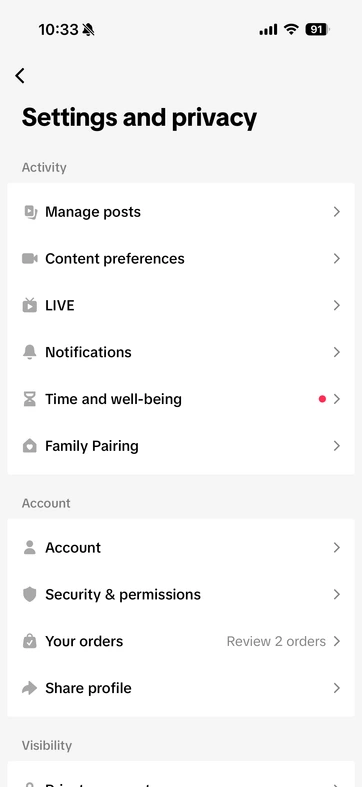
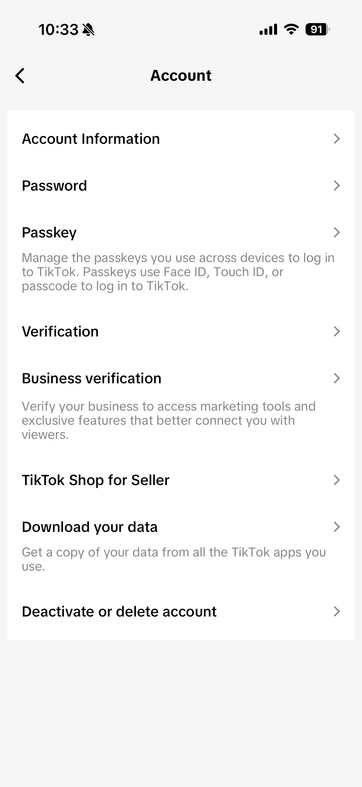
In some versions of the app, the path is different: Business suite → Business registration. If the option isn’t there at all, verification isn’t available yet for your market or account.
Step 2. Fill in the basic information
Fill in the Basic information form with your business details, exactly as they appear in your documents.
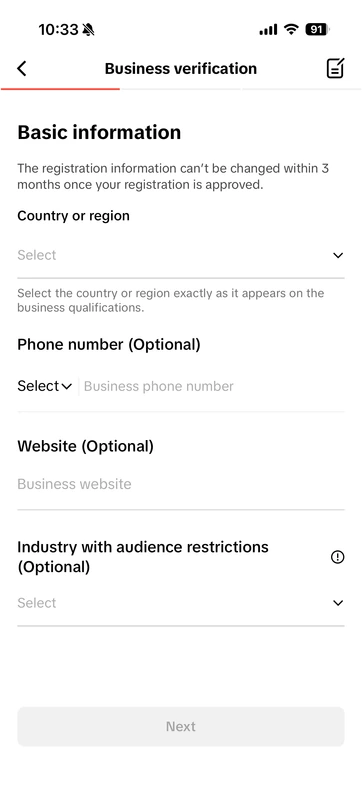
- Country or region: the actual country where the business is registered, as in the documents.
- Phone number / Website: fill these in if the form asks for them. Website here means the website of the business being verified. Don’t paste your dashboard link here: it goes in your profile in Step 4.
- Industry: the business’s actual line of work.
Tap Next. The set of fields depends on the country and the app version.
Important. Once approved, this information can’t be changed for 3 months, as the form itself states. The country and the document type must match.
Step 3. Upload the document
Add the document file. Enter the legal name in Legal business name and the registration number in Business license ID. Both must match the document character for character.
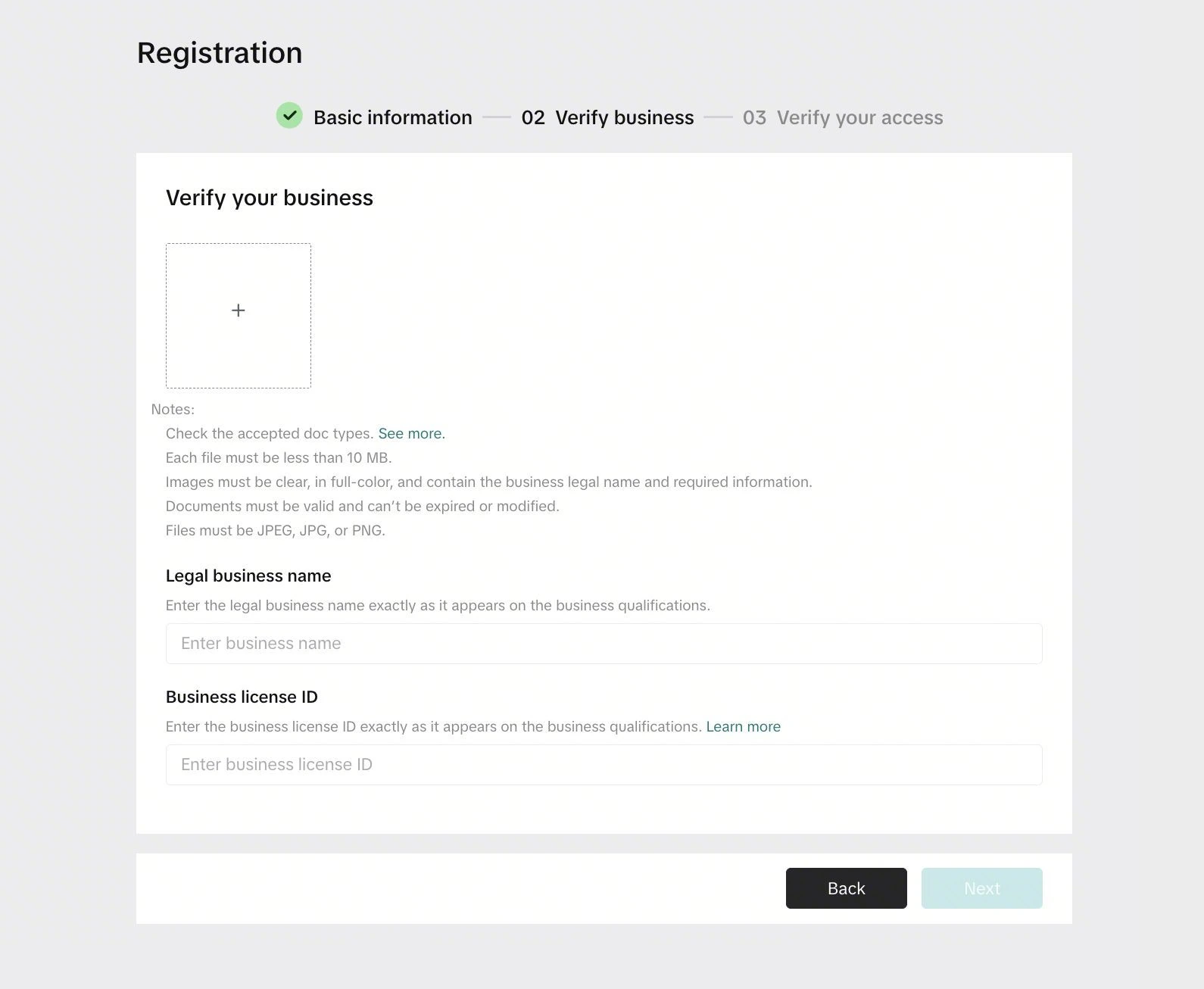
TikTok lists the accepted file format and maximum file size under the upload field. Then tap Next → confirm access using the method TikTok offers → Submit. You can track the application status in Business verification. Review usually takes 1–5 business days.
Step 4. Add the link to your profile
The path is Profile → Edit profile → Links → Add. In another version of the interface, the field is called Website.
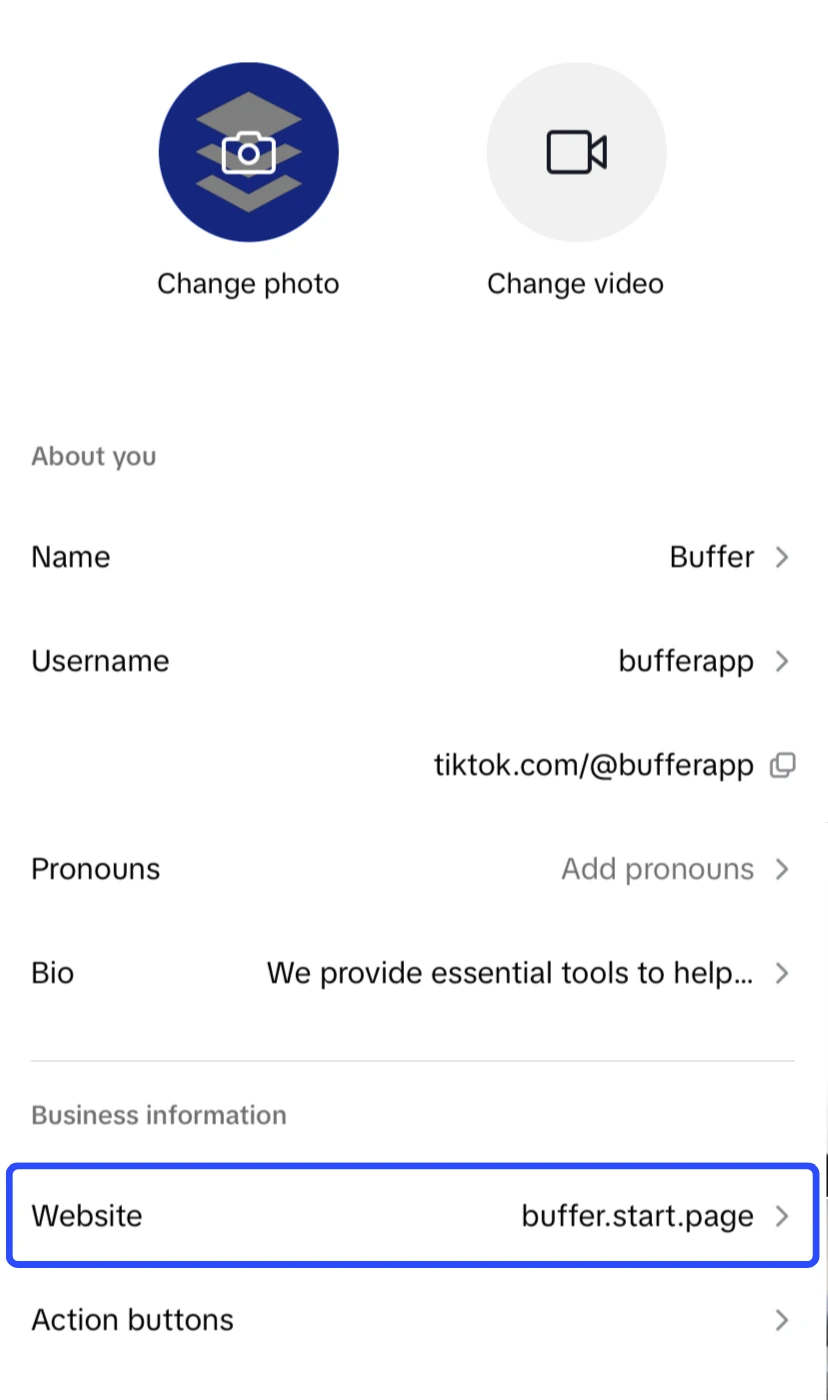
- Copy the link in the Monetiz dashboard: all of it, with no changes.
- Paste it into Website and save.
- Add the bio text (Bio) if the offer requires it: in the UYAVA offer, a video without the theme link and text isn’t approved.
- Test the click: open your profile from another account and tap the link. The offer page should open.
How do you make sure clicks are credited to you?
Use the link from the dashboard in full and unchanged, or the clicks won’t be credited to you.
- Don’t remove the partner ID, parameters or parts of the path from the link.
- Don’t replace the address you were given with the one that opened in your browser after clicking.
- Don’t use the monetiz.space homepage: clicks from it won’t be credited to you.
- Switched to another offer or theme? Replace the link and test the click again.
What should you do if TikTok rejects your application?
Check the rejection reason against your country, document type and business details. The file must be readable and valid, with all corners visible and no third-party watermarks. For details, see TikTok’s help article on verification errors.
If verification was approved but there’s still no website field, contact TikTok support. If the documents are the problem, message Support on Telegram and we’ll help.
Checklist
Sources: links in your profile · business verification · how to apply · documents by country · verification errors. Screenshots: TikTok Commercial UGC, TikTok, web form, Buffer. TikTok’s interface gets updated, so the menu names in your app may differ slightly.
Test yourself
-
When does TikTok show the link field in your profile without business verification?
Show answer
Correct: At 1,000 followers or more (if TikTok has enabled the feature in your market). The other route is a Registered Business Account, meaning your business verification has been approved.
-
Which link should you put in your profile?
Show answer
Correct: The full link from the dashboard, with no changes. The link you’re given contains your partner ID. The homepage or the address after a redirect won’t credit clicks to you.
-
How long does TikTok business verification usually take?
Show answer
Correct: 1–5 business days. You can see the status of your application in Settings and privacy → Account → Business verification.